Every Nix developer uses shell scripts. Whether wrapping build commands, automating deployment tasks, or providing developer tooling, scripts are the connective tissue of any Nix-based workflow. The question is not whether to use them, but how to integrate them properly into a reproducible system.
This post covers the practical tooling and philosophical approach that makes Nix workflows effective: from the mechanics of shell script integration to the broader principle that if something is not captured in Nix, it is not truly solved.
Shell Scripts in Nix: The Options
Nixpkgs provides several functions for creating shell scripts, each with different tradeoffs. Understanding which to use saves debugging time.
writeShellScript and writeShellScriptBin
The basic option. writeShellScript creates an executable script in the Nix store; writeShellScriptBin places it in a bin/ subdirectory for PATH integration. Both prepend a shebang automatically.
The limitation: dependencies must be referenced by full store path. If your script calls curl, you need ${pkgs.curl}/bin/curl, not just curl. This is explicit, which is good for reproducibility, but verbose for complex scripts.
writeShellApplication
The modern choice. writeShellApplication accepts a runtimeInputs parameter that handles PATH setup automatically. It also enables shellcheck validation and sets sensible bash options (errexit, nounset, pipefail) by default.
For new scripts, this is the recommended approach. The automatic linting catches common shell script errors before they reach production.
One caveat: shellcheck can produce false positives. When that happens, use the excludeShellChecks parameter to suppress specific rules rather than disabling shellcheck entirely. This keeps the safety net intact for everything else.
Workflow Tooling: flake-utils and lint-utils
Two tools appear consistently in production Nix workflows: flake-utils from numtide and lint-utils from homotopic.
flake-utils (numtide)
This library simplifies cross-platform flake outputs. The eachDefaultSystem function eliminates boilerplate for supporting multiple architectures. Some consider it unnecessary abstraction; others find it essential. The practical value is reduced copy-paste when a flake needs to work on both x86_64-linux and aarch64-darwin.
For finer control over which systems are supported, the inputs.systems override pattern is now the recommended approach. It lets downstream users of your flake adjust the system list without forking:
inputs.systems.url = "github:nix-systems/x86_64-linux";
inputs.flake-utils.inputs.systems.follows = "systems";
lint-utils (homotopic)
Available at gitlab.homotopic.tech/nix/lint-utils, this provides a framework for adding linters to nix flake check. The mechanism is straightforward: create a derivation containing a git repository, run a linter, and check if anything changed via git status.
A practical application: checking that generated documentation stays synchronized with source code. Run the documentation generator as part of the lint check; if the output differs from what is committed, the check fails. This enforces documentation updates without relying on code review diligence alone.
DevShell Patterns and Anti-Patterns
The development shell is where teams most often introduce unnecessary complexity.
A common anti-pattern: embedding personal editor configurations in project devshells. The scenario: Developer A commits their complete Neovim configuration to the project flake. Developer B, preferring Emacs, adds their configuration alongside. Now the project contains two complete editor setups that benefit exactly two people and complicate maintenance for everyone else.
The fix: separate user configuration from project configuration. Editor setups belong in personal NixOS configurations or home-manager profiles, not project repositories. Project devshells should contain project dependencies: compilers, language servers, formatters, and build tools. Not color schemes.
The exception: project-specific editor plugins that would not exist outside the project context. Even then, consider whether this is truly project infrastructure or developer preference.
Secrets Management: secrix
The Nix store is world-readable. Secrets cannot go there unencrypted.
secrix is Platonic Systems' own secrets management tool for NixOS. Built on age encryption with SSH host key decryption, it improves on agenix by eliminating the need for a separate secrets declaration file — secrix derives that configuration automatically from your NixOS module declarations.
The workflow: encrypt secrets locally with authorized public keys, commit the encrypted files to the repository, and let the target system decrypt at activation time using its SSH host key. No extra secrets manifest to maintain, no duplication.
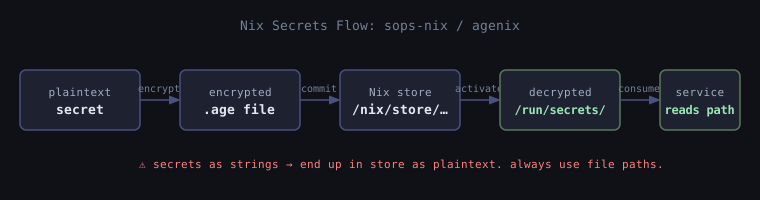
The critical point: passing secrets as plaintext strings in Nix configuration means those secrets end up in the store. Use file paths to decrypted secrets, not the secrets themselves. This is a common mistake that defeats the purpose of secret management entirely.
Integration Testing
Linting catches style and formatting issues. Integration testing catches behavioral ones. NixOS has native support for both via nix flake check.
The testers.runNixOSTest function (previously nixosTest) lets you run full VM-based integration tests as derivations. A test spins up one or more NixOS VMs, runs a Python test script against them, and passes or fails like any other check. Because these tests are derivations, they benefit from all the usual Nix properties: reproducible, cacheable, auditable.
This is a natural extension of the reproducibility philosophy. If your service's behavior is not captured in a test, you are relying on manual verification which is another form of uncaptured state.
Common Gotchas
A few failure modes that come up repeatedly:
Secrets as strings. Covered above, but worth repeating: environment.variables.MY_SECRET = "hunter2" puts that value in the Nix store in plaintext. Always use file paths to runtime-decrypted secrets.
Dirty git trees breaking lint-utils. The lint-utils approach diffs against git state. An uncommitted file will cause checks to fail in ways that look confusing. Keep a clean working tree when running nix flake check.
IFD (Import From Derivation) in flake checks. If your flake evaluation imports a derivation result, nix flake check will fail in restricted evaluation mode. IFD is sometimes unavoidable but should be intentional.
shellcheck false positives. SC2154 and similar rules sometimes fire on valid patterns. Use excludeShellChecks = [ "SC2154" ] rather than removing shellcheck from the pipeline.
The Philosophy: If It Is Not in Nix, It Is Not Solved
DevOps work often involves workarounds. A server runs out of memory, so you increase the RAM allocation. A service crashes intermittently, so you add a restart policy. These are patches, not solutions.
The distinction matters. A workaround fixes the symptom. A solution addresses the cause. In imperative systems, the two blur together because system state accumulates silently. In Nix, the boundary is clear: if the fix is not represented in the configuration with a corresponding hash change, the system can drift back to the broken state.
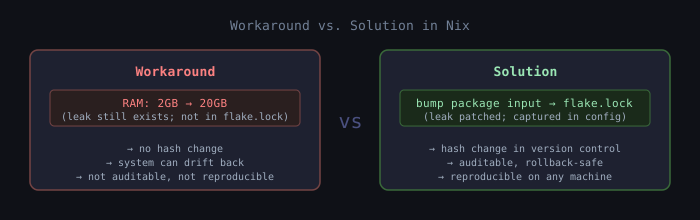
Consider a database memory leak. The workaround: increase server RAM from 2GB to 20GB so the leak takes longer to cause problems. The solution: version bump the database package to a release that fixes the leak, then update the flake.lock. The workaround might be necessary as a temporary measure. But it is not the resolution. The resolution is the input change in the flake that can be audited, reproduced, and rolled back.
The Business Case for Reproducibility
Reproducibility is not a technical preference. It is a business requirement in contexts where consistency matters.
Onboarding time: A new developer runs nix develop and has a complete environment. No hours lost to dependency conflicts or "works on my machine" debugging.
Incident resolution: When production breaks, the question "who changed what" is answerable from version control. Every deployment corresponds to a specific flake revision.
Rollback confidence: Rolling back to a previous generation restores the previous state. No wondering whether manual changes will be preserved or lost.
Audit compliance: For regulated industries, being able to prove exactly what code ran in production at any historical point is not optional. Nix provides this by design.
Teams adopting Nix have reported meaningful reductions in onboarding time, environment-related incidents, and container image sizes the result of precise dependency specification rather than bundling everything.
Practical Takeaways
For shell scripts: use writeShellApplication for new work. The automatic linting and runtimeInputs handling eliminate common errors. Suppress specific shellcheck rules with excludeShellChecks when needed.
For project tooling: add lint-utils to nix flake check. Start with Nix formatting and expand to language-specific linters as needed. Add testers.runNixOSTest integration tests for any service behavior you care about.
For devshells: keep them minimal. Project dependencies belong in the project. Personal preferences belong in personal configuration.
For secrets: use secrix — Platonic's own NixOS secrets tool. Pass file paths to decrypted secrets, never the secrets themselves.
For workflow: treat the flake as the source of truth. If a change is not in the flake, it is a workaround, not a solution.
Closing
Nix workflows are not complicated by necessity. They become complicated when tools are used without understanding their purpose, when personal preferences are confused with project requirements, and when patches are treated as permanent fixes.
The path well-trodden in Nix is well-documented and works. The tooling for shell scripts, linting, secrets, and testing all exists. The job is mostly to learn what is already there before assuming a problem requires something new.
The goal is systems that behave predictably, can be understood from their configuration, and can be reproduced without heroic effort. Nix is a means to that end.